


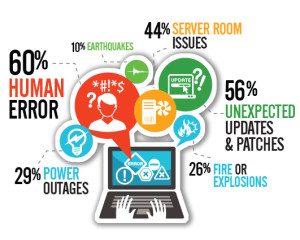
This year, disaster recovery (DR) has been a top priority for 45 per cent of UK IT departments. With the increase in legal and regulatory compliance coupled with virtualisation and cloud-based strategies for disaster recovery, more IT departments (5 per cent more than 2014, to be exact) are recognising the importance of DR.
But knowing DR is necessary and implementing it effectively are two separate things. In a separate study by Timico, only 5 per cent of respondents said they were totally confident that their DR plan was adequate.
UK businesses face both man-made and natural disaster such as software and power failures, electrical fires, and flash flooding or high winds. Today, customers expect always-on service, so how can an IT department do its part to avoid downtime when disaster strikes?
Each business has different requirements depending on the company’s industry and size, but following these guidelines can help the business prepare its IT infrastructure for a disaster.
Prioritise critical systems :
One of the most important components of being ready for a disaster is classifying important systems and processes and mapping out any interdependencies. A financial organisation, for example, probably needs to restore customers’ online access to their accounts before it restores access to internal files. If the servers powering the customer portal are dependent on other systems or a specific power supply, the business must take measures to ensure redundancy of the core servers and power supplies.
Of course, prioritising systems and processes should not be conducted by IT alone. Input from other departments is critical to successfully recovering from downtime, because what IT may consider critical is not a top priority for other key departments. This is why the DR plan should be created in conjunction with a business continuity plan. Typically the business continuity plan is driven by the results of business impact and risk analyses, which have identified the business’s core objectives and departmental priorities.
Identify a solution for backing up and recovering an IT environment :
Whether it’s legacy systems that can’t keep up with growing volumes of data, a lack of redundancy or storage media corruption, too many businesses realise during a disaster that they aren’t able to recover their data, or worse, their IT environment. In fact, data loss is up by more than 400 per cent since 2012, according to the EMC Global Data Protection Index. It’s important that a business’s current backup and recovery solution ensure the strategy is adequate for the business’s needs and can protect critical data and systems.
For example, Lyco, a specialist lighting e-commerce company based in Milton Keynes, had backed up to disk on-site. But as the organisation’s business grew, management realised the risk of housing backups on-site was too great. They wanted to move backups off-site while reducing recovery time objectives (RTOs). The backup software they were using, however, was not designed to write to a disk at a third-party site, so they switched to the disaster recovery as a service (DRaaS) solution BlackVault Managed Recovery Platform, which uses an on-site appliance in conjunction with a private cloud, BlackCloud.
The benefit of this approach is that the organisation was able to manage backups on-site while efficiently sending them off-site to ensure data redundancy. During a disaster, employees are able to access the environment over the Internet or another connectivity option.
The appeal of DRaaS solutions is that they provide the ability to recover key IT systems and data quickly (within a 2-4 hour recovery time objective in some cases), which is crucial to meeting customers’ expectations for high availability.
Decide how and where employees will resume operations :
Companies need to have an alternate work environment available at the time of an emergency, whether it’s employees’ homes or rented office space. If renting office space, the facility should be pre-contracted to help ensure it will be available during a disaster.
Simply having a space is not adequate, however. Staff members need a way to access their work environment, including documents, business applications and communications platforms such as email and instant messaging. As a managed service provider, we have found that companies are increasingly using DRaaS solutions, which allow employees to access the environment through a VPN or online. Having a backup Internet provider can help ensure a reliable connection will be available.
Have a plan for receiving business phone calls :
Communication is key in any disaster recovery scenario, so businesses need to consider how they will continue to receive calls. If using landlines, the business should consult its telecomm carrier or managed service provider to review options for rerouting numbers in the event of a disaster. These offerings will expedite the reroute of telephone numbers, rather than calling at time of disaster to have the calls rerouted, which could take hours, if not a day or two.
If a business has a cloud-based or voice over IP (VoIP) telephony solution in place, communication options can be remotely managed. Businesses are able to deploy pre-recorded greetings and redirect phones to staff cell phones or an alternate office location. This solution ensures employees can take inbound calls as well as make outbound calls in the event of a disaster.
When redirecting calls to cell phones during a disaster, businesses should bear in mind that during a large-scale crisis, overloaded circuits can make it difficult to obtain a signal for placing calls, and emergency services might invoke the government’s Mobile Telecommunication Privileged Access Scheme (MTPAS) procedure. The London bombings of 7/7 is a prime example: for four hours, the network within a mile of Aldgate Tube station was disabled. In these situations, redirecting calls to a landline can provide a more reliable connection.
Document and regularly test the disaster recovery plan
Documenting the disaster recovery plan is an important step, because during a high-pressure situation it’s all too easy to neglect key parts of the plan. In addition, if any critical personnel who were involved in the planning process leave the business, subsequent employees can properly implement the plan. The documentation can also be useful if a managed service provider plays a role in implementing any part of the plan.
For a plan to reach its maximum effectiveness, however, it should be tested regularly (annually at minimum) to work out any kinks before a crisis arises. Those responsible might balk at the cost of testing the plan because of resources consumed (e.g. bandwidth) and the disruption to daily operations, but the alternative of not testing enough or at all is a risk that could leave a business vulnerable after a disaster.
It may help to break down disaster recovery testing into manageable parts until an organisation is able to complete a full test. Some businesses will perform an IT test of specific systems or processes before conducting a full-scale test involving end users. If an organisation is using a DRaaS solution, IT personnel should take advantage of the ability to spin up a sandbox environment so they can test recovery capabilities without affecting production systems.
After successfully completing a test run, the business can schedule a follow-up test, involving end users as necessary.
With the right plan in place, a business can cope with a range of disasters – whether a small, localised one like server failure or a region-wide flood – without sacrificing uptime and customers.[su_box title=”About Brandon Tanner” style=”noise” box_color=”#336588″] Brandon Tanner is a successful entrepreneur with a technology background that spans software, hardware and service solutions for financial institutions and other regulated industries. He is the senior manager for nationwide managed service provider IT Specialists (ITS) and its sister organisation, Rentsys in the US and is the key, driving force behind the company’s business continuity and disaster recovery products and services, including the next generation of cloud and recovery products, BlackCloud and BlackVault. The combination of Brandon’s technology and regulatory expertise has led to several innovative cloud strategies that have helped customers maintain compliance more cost-effectively.[/su_box]

The opinions expressed in this post belong to the individual contributors and do not necessarily reflect the views of Information Security Buzz.