Close Menu
  • Home
  • Articles
    • Attacks
      • BEC
      • Data Breach
      • DDoS
      • Evasion Attacks
      • Injection
      • Malware
      • MITM
      • Phishing
      • Ransomware
      • RCE
      • Social Engineering
      • Spoofing
      • Spyware
    • Business and Policy
      • BCP and DRP
      • GRC
      • Regulations
    • Data Protection
      • DLP
      • DRM
      • Encryption
      • IAM
    • Future, Trends and Insight
      • AI
      • Events & Community
      • Emerging Tech
      • Expert Panel
      • Interviews With Experts
      • Insights
      • Study & Research
    • Resources
      • Guides
      • Tools
      • Training & Education
    • Security
      • API
      • Apps
      • Cloud
      • Critical Infrastructure
      • Endpoint
      • Hardware
      • IoT
      • Mobile
      • Network
      • OT
      • Port Security
      • Security Architecture
      • Software Development
      • Supply Chain
      • Zero Trust
    • Threats and Vulnerabilities
      • Emerging Threats
      • Insider Threats
      • Risk Management
      • Threat Intelligence
      • Zero Day
  • News and Exclusives
    • Latest News
    • ISB Exclusive
    • Positive News
  • Who We Are
    • About Us
    • Information Security Buzz Expert Panel​
    • Write for Us
    • Media Pack
  • Contact Us
  • Newsletter
Facebook X (Twitter) LinkedIn
Information Security BuzzInformation Security Buzz
  • Home
  • Articles
    • Attacks
      • BEC
      • Data Breach
      • DDoS
      • Evasion Attacks
      • Injection
      • Malware
      • MITM
      • Phishing
      • Ransomware
      • RCE
      • Social Engineering
      • Spoofing
      • Spyware
    • Business and Policy
      • BCP and DRP
      • GRC
      • Regulations
    • Data Protection
      • DLP
      • DRM
      • Encryption
      • IAM
    • Future, Trends and Insight
      • AI
      • Events & Community
      • Emerging Tech
      • Expert Panel
      • Interviews With Experts
      • Insights
      • Study & Research
    • Resources
      • Guides
      • Tools
      • Training & Education
    • Security
      • API
      • Apps
      • Cloud
      • Critical Infrastructure
      • Endpoint
      • Hardware
      • IoT
      • Mobile
      • Network
      • OT
      • Port Security
      • Security Architecture
      • Software Development
      • Supply Chain
      • Zero Trust
    • Threats and Vulnerabilities
      • Emerging Threats
      • Insider Threats
      • Risk Management
      • Threat Intelligence
      • Zero Day
  • News and Exclusives
    • Latest News
    • ISB Exclusive
    • Positive News
  • Who We Are
    • About Us
    • Information Security Buzz Expert Panel​
    • Write for Us
    • Media Pack
  • Contact Us
  • Newsletter
Subscribe
Information Security BuzzInformation Security Buzz
Home - Articles - AVG TuneUp’s New Deep Sleep Mode Tackles Slow PCs
Articles

AVG TuneUp’s New Deep Sleep Mode Tackles Slow PCs

ISB Editorial StaffBy ISB Editorial StaffDecember 7, 2016Updated:December 19, 20163 Mins Read
Share LinkedIn Twitter Facebook Copy Link Email
PCI's mandatory pen testing
Share
Facebook Twitter LinkedIn Email Copy Link
Quick AI Summary
ChatGPTClaudeGeminiGrokPerplexityDeepSeekCopilot

Are you tired of your sluggish PC? The new release of AVG TuneUp now comes with a complete reboot of its patented ‘Programs-On-Demand’ technology. It puts unused programs into a smart sleep mode that reduces their draining impact on PC performance, battery life, network and storage to nearly zero. The update also includes a revamped Disk Cleaner which now detects and removes even more leftover and cache files than before. 

 Get the latest version right here: Click to Download AVG TuneUp with new Sleep mode

Even in 2016, PCs face one stark reality: the more you use them and the more you install on them, the slower they become. That’s because a lot of programs remain active, even when they’re not being used.
avg-pc-tune-up

Enhanced Sleep Mode – a quick guide

 The new version of AVG TuneUp comes with a significantly improved Sleep Mode, which stops inactive programs from draining your PC, giving you back that fresh out-of-the-box performance.

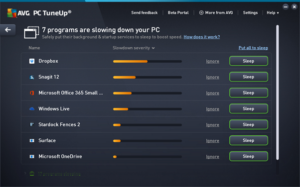
We have combined our Startup Manager feature – which detects items that automatically run when you turn your computer on – with what we used to call Program Deactivator (now known as Sleep Mode). Sleep Mode now shows a single list of all the applications that are draining your PC’s performance, giving you smarter detection across even more programs.
avg

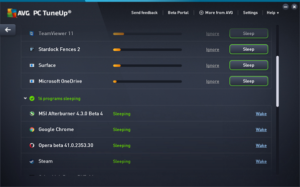
The list shows which applications are draining the most power and with one click, you can select the ones you want to put to sleep. You also have the option to put apps on an ‘Ignore’ list, which is useful for those programs you really want to keep running in the background, such as remote assistance tools or power management apps for laptops. Turning off all other programs running in the background will reduce performance and battery draining; and whenever you need a certain program, AVG TuneUp will turn it back on again as soon as you access it.

The newly enhanced Sleep Mode isn’t the only improvement we’ve made to AVG TuneUp.

Enhanced Disk Cleaner – a quick guide

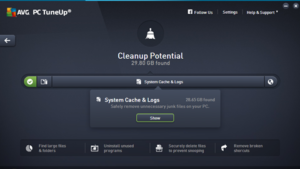
Most of us will have experienced an issue with disk space. This is often due to applications piling up their leftover cache data, log files, crash reports etc. on your disk. We’ve catered to the latest applications and Windows features to help you to get rid of even more digital junk files on your machine. Here’s what we added to our Enhanced Disk Cleaner:

  • Added cleaning for new Microsoft Office versions
  • Cleans wasteful Windows Defender leftover files
  • Clears the Windows 10 settings sync cache
  • Clears the Windows font cache
  • Clears the Windows Search cache
  • Clears the SnagIt thumbnail cache
  • Removes log files from Evernote
  • Removes list of recent files from MPC-HC (Media Player Classic)
  • Removes list of recent files from Notepad++
  • …and much more!

cleanup

Our Browser Cleaner also removes even more browsing caches, database leftover files, user caches and traces from Windows 10 Edge, Google Chrome and Mozilla Firefox.
…plus a ton of fixes and improvements!

So, what else is new? We’ve looked hard at all your feedback and polished things up. For example, our Live Optimization now smoothly handles whitelisting an application you don’t want de-prioritized. In addition, we’ve revamped our notification system to show you more meaningful messages about our features (such as Program Optimizer, Economy Mode) when you need them.

To check out your new features, launch your AVG TuneUp (it should auto-update) or download AVG TuneUp here.

[su_box title=”About AVG” style=”noise” box_color=”#336588″][short_info id=’60254′ desc=”true” all=”false”][/su_box]

ISB Editorial Staff
  • ISB Editorial Staff
    Navigating the Cyber Threat Landscape: Key Insights from Trellix ARC’s Q1 2023 Report
  • ISB Editorial Staff
    Experts’ Responses: Cyber Security Predictions 2022
  • ISB Editorial Staff
    ISB Virtual Conference: Key Cyber Security Challenges and Solutions in 2021
  • ISB Editorial Staff
    Cyber Security Predictions 2021: Experts’ Responses

The opinions expressed in this post belong to the individual contributors and do not necessarily reflect the views of Information Security Buzz.

Share. Facebook Twitter LinkedIn Email Copy Link

Related Posts

The Real Cost of Inconsistent Third-Party Access

December 18, 20255 Mins Read

What Happens When Devices Cross Borders? The Role of Geofencing in Global IT

August 7, 20256 Mins Read

The Evolving Importance of Identity Governance in FinTech

July 10, 20258 Mins Read
ISB-Bora-Side-Bar

No se ha podido establecer conexión. Error 429

 
ISB-Bora-Side-Bar
Black ISB Logo

Information Security Buzz is an independent resource that provides the experts’ comments, analysis, and opinion on the latest Cybersecurity news and topics

X (Twitter) LinkedIn Facebook RSS

Working With Us

  • About Us
  • Advertise With Us
  • Contact Us

Write For Us

  • How To Contribute

The Pages

  • Privacy Policy
  • Cookie Policy
  • AI Policy
  • Terms & Conditions
  • Copyright Notice

Information Security Buzz and all its contents are copyright © 2014-2025. All rights reserved. All third-party trademarks are recognized.

Type above and press Enter to search. Press Esc to cancel.

Manage Consent
To provide the best experiences, we use technologies like cookies to store and/or access device information. Consenting to these technologies will allow us to process data such as browsing behavior or unique IDs on this site. Not consenting or withdrawing consent, may adversely affect certain features and functions.
Functional Always active
The technical storage or access is strictly necessary for the legitimate purpose of enabling the use of a specific service explicitly requested by the subscriber or user, or for the sole purpose of carrying out the transmission of a communication over an electronic communications network.
Preferences
The technical storage or access is necessary for the legitimate purpose of storing preferences that are not requested by the subscriber or user.
Statistics
The technical storage or access that is used exclusively for statistical purposes. The technical storage or access that is used exclusively for anonymous statistical purposes. Without a subpoena, voluntary compliance on the part of your Internet Service Provider, or additional records from a third party, information stored or retrieved for this purpose alone cannot usually be used to identify you.
Marketing
The technical storage or access is required to create user profiles to send advertising, or to track the user on a website or across several websites for similar marketing purposes.
  • Manage options
  • Manage services
  • Manage {vendor_count} vendors
  • Read more about these purposes
View preferences
  • {title}
  • {title}
  • {title}