

Close Menu
  • Home
  • Articles
    • Attacks
      • BEC
      • Data Breach
      • DDoS
      • Evasion Attacks
      • Injection
      • Malware
      • MITM
      • Phishing
      • Ransomware
      • RCE
      • Social Engineering
      • Spoofing
      • Spyware
    • Business and Policy
      • BCP and DRP
      • GRC
      • Regulations
    • Data Protection
      • DLP
      • DRM
      • Encryption
      • IAM
    • Future, Trends and Insight
      • AI
      • Events & Community
      • Emerging Tech
      • Expert Panel
      • Interviews With Experts
      • Insights
      • Study & Research
    • Resources
      • Guides
      • Tools
      • Training & Education
    • Security
      • API
      • Apps
      • Cloud
      • Critical Infrastructure
      • Endpoint
      • Hardware
      • IoT
      • Mobile
      • Network
      • OT
      • Port Security
      • Security Architecture
      • Software Development
      • Supply Chain
      • Zero Trust
    • Threats and Vulnerabilities
      • Emerging Threats
      • Insider Threats
      • Risk Management
      • Threat Intelligence
      • Zero Day
  • News and Exclusives
    • Latest News
    • ISB Exclusive
    • Positive News
  • Who We Are
    • About Us
    • Information Security Buzz Expert Panel​
    • Write for Us
    • Media Pack
  • Contact Us
  • Newsletter
Facebook X (Twitter) LinkedIn
Information Security BuzzInformation Security Buzz
  • Home
  • Articles
    • Attacks
      • BEC
      • Data Breach
      • DDoS
      • Evasion Attacks
      • Injection
      • Malware
      • MITM
      • Phishing
      • Ransomware
      • RCE
      • Social Engineering
      • Spoofing
      • Spyware
    • Business and Policy
      • BCP and DRP
      • GRC
      • Regulations
    • Data Protection
      • DLP
      • DRM
      • Encryption
      • IAM
    • Future, Trends and Insight
      • AI
      • Events & Community
      • Emerging Tech
      • Expert Panel
      • Interviews With Experts
      • Insights
      • Study & Research
    • Resources
      • Guides
      • Tools
      • Training & Education
    • Security
      • API
      • Apps
      • Cloud
      • Critical Infrastructure
      • Endpoint
      • Hardware
      • IoT
      • Mobile
      • Network
      • OT
      • Port Security
      • Security Architecture
      • Software Development
      • Supply Chain
      • Zero Trust
    • Threats and Vulnerabilities
      • Emerging Threats
      • Insider Threats
      • Risk Management
      • Threat Intelligence
      • Zero Day
  • News and Exclusives
    • Latest News
    • ISB Exclusive
    • Positive News
  • Who We Are
    • About Us
    • Information Security Buzz Expert Panel​
    • Write for Us
    • Media Pack
  • Contact Us
  • Newsletter
Subscribe
Information Security BuzzInformation Security Buzz
Home - News & Analysis - Cybereason – We’ve Discovered A Vaccination That Disables The NotPetya Ransomware
News & Analysis

Cybereason – We’ve Discovered A Vaccination That Disables The NotPetya Ransomware

ISBuzz TeamBy ISBuzz TeamJune 29, 2017Updated:June 29, 20174 Mins Read
Share LinkedIn Twitter Facebook Copy Link Email
Dallas City Hit By Ransomware Assault Affects 2.6 Million People
Share
Facebook Twitter LinkedIn Email Copy Link
Quick AI Summary
ChatGPTClaudeGeminiGrokPerplexityDeepSeekCopilot

Update: We’ve discovered a vaccination that disables the NotPetya ransomware.

 Cybereason Principal Security Researcher Amit Serper discovered a work around solution that disables the NotPetya ransomware that wreaked havoc in Europe on Tuesday. To activate the vaccination mechanisms users must locate the C:\Windows\ folder and create a file named perfc, with no extension name. This should kill the application before it begins encrypting files.

When first run, the NotPetya ransomware searches for its own filename in the C:\windows\ folder, and if it is found, will cease operating. Once the original file name was found and verified by two different sources, Amit was able to piece together a kill switch that should work for any instance of the original ransomware infection.

 Petya-like Ransomware Attack: What You Need to Know

Ransomware with functionality that’s similar to Petya ransomware has infected organizations across Europe, bringing business to a standstill. Ukraine businesses have so far beared the brunt of the attack. Supermarkets, gas stations and banks in the country along with its public transportation system and major telecommunications provider reported that their systems have been compromised. Like the WannaCry attack, this ransomware supposedly uses the EternalBlue exploit to spread.

Other affected organizations include British advertising agency WPP, Danish shipping company Maersk and Russian oil company Rosneft. The infection began Tuesday morning as European workers arrived at the office and turned on their computers and is believed to be spreading west as the day progresses.

After infecting systems, the ransomware demands $300 in bitcoin. As of 2:30 p.m. EST, blockchain records show that 27 transactions have been made to the target wallet, totaling $6,820.

The attack shares some of the functionality of the Petya ransomware family, but cannot be conclusively tied to that family or campaign as of yet.

Observed behaviors

  • It kills itself prior to infection if the en_US keyboard layout is the only keyboard layout installed
  • It overwrites the Master Boot Record of the System with a malicious payload
  • It either forces a Hard Error within Windows which reboots the system, or creates a scheduled task to initiate a reboot after a set delay (eg, 2 hours)
  • Upon reboot, code inserted into the Master Boot Record which executes and encrypts user files on the system
  • It creates a scheduled task on the infected system prior to reboot that will re-encrypt the system if it is recovered through other means
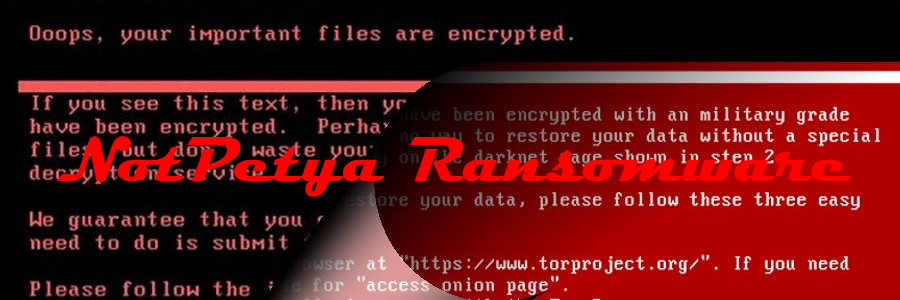
  • The “ransom” message is displayed to the user telling them how to pay for a recovery key

Behavioral indicators

Malware execution

  • The parent process of the infection will be “wevtutil.exe” with a command line that contains the word “security”
  • There will be a child process “cmd.exe” with a commandline that contains the word “deletejournal”

Below are action steps the Cybereason Intelligence Team recommends for prevention and mitigation:

Blacklist hashes

Add the following hashes to your blacklist, and if the prevention driver is installed, mark them for prevention.

06eff17186695d8f9ea466d159b3316d
82ed636b43a9739457b7460bc79bbd13
f7e6475366a65ac81740b539e1c58c1f
ccd721b4794a82167f94c9e6c54a7e09
3501a946998bbb35fca74e686591be41
5308e42d3978f5db730138ccdd0bd6dd
41787c17eb6e11018c31433a34c5e2f7
f22943e464da1294d732cdf688b0df21
c1232a57e1c929dfba38aea58b227598
bffabed92d5c9a6a5844bde6eccce651
674e86e29d34facd7a69bc5ccf626bc3
415FE69BF32634CA98FA07633F4118E1
0487382A4DAF8EB9660F1C67E30F8B25
A1D5895F85751DFE67D19CCCB51B051A

If you are not using SysInternals’ PSExec as an administrative tool in your environment, consider blacklisting the hash of the psexec version that is used in the attack:

aeee996fd3484f28e5cd85fe26b6bdcd

Block the Malware IPs at the Network Layer

Add the following IPs and domains to your firewalls and other network control measures (inbound and outbound):

95.141.115.108
84.200.16.242
111.90.139.247
185.165.29.78
Yadi[.]sk
Sundanders[.]online
Coffeinoffice[.]xyz
french-cooking[.]com

Block Lateral Movement at the Network Layer

Block SMBv1 across your organization to prevent lateral movement. Block SMB traffic from the internet to your internal network ranges.

Apply Windows Patches to Prevent Lateral Movement

Patch all Windows distributions against the EternalBlue exploit (Patch MS17-010).

Install MBR filtering

Install an MBR filter by TalosIntelligence Note: this tool is not officially supported or endorsed by cybereason; liability remains with the user.

Warn users about unexpected restarts

Instruct users that if the machine suddenly and inexplicably restarts – shut it down immediately and don’t restart it. IT Support Teams can restore the original MBR using a Windows boot disk to prevent encryption of files if the machine is powered off quickly enough.

Enable secure boot

Turn on secure boot when applicable (mostly laptops)

ISBuzz Team
  • ISBuzz Team
    Air Canada Data Breach: BianLian Extortion Group Claims A Massive Heist Contrary To Airline’s Earlier Statement
  • ISBuzz Team
    Unprecedented DDoS Attack Rocks The Web: Tech Giants Reveal A Digital Tsunami
  • ISBuzz Team
    CISA Flags High-Severity Adobe Acrobat Reader Flaw Amid Active Exploits
  • ISBuzz Team
    Curl Security Alert: Patching A Critical Bug Averting Potential Cyber Catastrophe

The opinions expressed in this post belong to the individual contributors and do not necessarily reflect the views of Information Security Buzz.

Share. Facebook Twitter LinkedIn Email Copy Link

Related Posts

Visual data is the blind spot in enterprise security: that’s about to change

May 4, 20267 Mins Read

Making stolen data worthless: why security must start with the data

March 30, 20265 Mins Read

Meta’s Smart Glasses Privacy Scandal Expands After Sama Credentials Found on the Dark Web

March 10, 20264 Mins Read
ISB-Bora-Side-Bar

No se ha podido establecer conexión. Error 429

 
ISB-Bora-Side-Bar
Black ISB Logo

Information Security Buzz is an independent resource that provides the experts’ comments, analysis, and opinion on the latest Cybersecurity news and topics

X (Twitter) LinkedIn Facebook RSS

Working With Us

  • About Us
  • Advertise With Us
  • Contact Us

Write For Us

  • How To Contribute

The Pages

  • Privacy Policy
  • Cookie Policy
  • AI Policy
  • Terms & Conditions
  • Copyright Notice

Information Security Buzz and all its contents are copyright © 2014-2025. All rights reserved. All third-party trademarks are recognized.

Type above and press Enter to search. Press Esc to cancel.

Manage Consent
To provide the best experiences, we use technologies like cookies to store and/or access device information. Consenting to these technologies will allow us to process data such as browsing behavior or unique IDs on this site. Not consenting or withdrawing consent, may adversely affect certain features and functions.
Functional Always active
The technical storage or access is strictly necessary for the legitimate purpose of enabling the use of a specific service explicitly requested by the subscriber or user, or for the sole purpose of carrying out the transmission of a communication over an electronic communications network.
Preferences
The technical storage or access is necessary for the legitimate purpose of storing preferences that are not requested by the subscriber or user.
Statistics
The technical storage or access that is used exclusively for statistical purposes. The technical storage or access that is used exclusively for anonymous statistical purposes. Without a subpoena, voluntary compliance on the part of your Internet Service Provider, or additional records from a third party, information stored or retrieved for this purpose alone cannot usually be used to identify you.
Marketing
The technical storage or access is required to create user profiles to send advertising, or to track the user on a website or across several websites for similar marketing purposes.
  • Manage options
  • Manage services
  • Manage {vendor_count} vendors
  • Read more about these purposes
View preferences
  • {title}
  • {title}
  • {title}