


Close Menu
  • Home
  • Articles
    • Attacks
      • BEC
      • Data Breach
      • DDoS
      • Evasion Attacks
      • Injection
      • Malware
      • MITM
      • Phishing
      • Ransomware
      • RCE
      • Social Engineering
      • Spoofing
      • Spyware
    • Business and Policy
      • BCP and DRP
      • GRC
      • Regulations
    • Data Protection
      • DLP
      • DRM
      • Encryption
      • IAM
    • Future, Trends and Insight
      • AI
      • Events & Community
      • Emerging Tech
      • Expert Panel
      • Interviews With Experts
      • Insights
      • Study & Research
    • Resources
      • Guides
      • Tools
      • Training & Education
    • Security
      • API
      • Apps
      • Cloud
      • Critical Infrastructure
      • Endpoint
      • Hardware
      • IoT
      • Mobile
      • Network
      • OT
      • Port Security
      • Security Architecture
      • Software Development
      • Supply Chain
      • Zero Trust
    • Threats and Vulnerabilities
      • Emerging Threats
      • Insider Threats
      • Risk Management
      • Threat Intelligence
      • Zero Day
  • News and Exclusives
    • Latest News
    • ISB Exclusive
    • Positive News
  • Who We Are
    • About Us
    • Information Security Buzz Expert Panel​
    • Write for Us
    • Media Pack
  • Contact Us
  • Newsletter
Facebook X (Twitter) LinkedIn
Information Security BuzzInformation Security Buzz
  • Home
  • Articles
    • Attacks
      • BEC
      • Data Breach
      • DDoS
      • Evasion Attacks
      • Injection
      • Malware
      • MITM
      • Phishing
      • Ransomware
      • RCE
      • Social Engineering
      • Spoofing
      • Spyware
    • Business and Policy
      • BCP and DRP
      • GRC
      • Regulations
    • Data Protection
      • DLP
      • DRM
      • Encryption
      • IAM
    • Future, Trends and Insight
      • AI
      • Events & Community
      • Emerging Tech
      • Expert Panel
      • Interviews With Experts
      • Insights
      • Study & Research
    • Resources
      • Guides
      • Tools
      • Training & Education
    • Security
      • API
      • Apps
      • Cloud
      • Critical Infrastructure
      • Endpoint
      • Hardware
      • IoT
      • Mobile
      • Network
      • OT
      • Port Security
      • Security Architecture
      • Software Development
      • Supply Chain
      • Zero Trust
    • Threats and Vulnerabilities
      • Emerging Threats
      • Insider Threats
      • Risk Management
      • Threat Intelligence
      • Zero Day
  • News and Exclusives
    • Latest News
    • ISB Exclusive
    • Positive News
  • Who We Are
    • About Us
    • Information Security Buzz Expert Panel​
    • Write for Us
    • Media Pack
  • Contact Us
  • Newsletter
Subscribe
Information Security BuzzInformation Security Buzz
Home - Industry News - How to Rebuild and Restore SQL Server Master Database
Industry News Articles CyberSecurity Tools Data Protection Security

How to Rebuild and Restore SQL Server Master Database

Guest AuthorBy Guest AuthorFebruary 17, 2025Updated:February 27, 20256 Mins Read
Share LinkedIn Twitter Facebook Copy Link Email
SQL
Share
Facebook Twitter LinkedIn Email Copy Link
Quick AI Summary
ChatGPTClaudeGeminiGrokPerplexityDeepSeekCopilot

In MS SQL Server, master database is the primary database that stores system information. This includes login details, linked servers, endpoints, system configurations, existence of other databases, etc. If the master database gets corrupted or damaged, the SQL Server service or instance may not start. Also, the other databases can become inaccessible.

In this article, we’ll discuss what causes corruption in SQL Server master database and how to rebuild and restore the master database.

Causes of Corruption in Master Database in SQL Server

The master database in SQL Server can get corrupted due to one or more of the below reasons:

  • Bad sectors on the hard drive where the master database is located.
  • Sudden system shutdown while working on the master database.
  • Bugs in MS SQL Server.
  • Malware or virus infection in the system hosting the database/server.
  • Sudden restart of MS SQL Server instance.

Methods to Restore the Master Database in SQL Server

The following are some methods you can use to rebuild or restore the SQL Server master database. However, before proceeding, ensure the following:

  • Select all server-side configuration values.
  • Note down the location of all the data and log files in the system database.
  • Check whether you have a latest and readable full backup.

Method 1: Repair Server Installation Files using SQL Server Installer

If the server installation files in master database are corrupted, then you can try repairing them by using the MS SQL Server Installer. To do so, follow these steps:

  • Locate the SQL Server installer folder on your system and click on setup.exe.
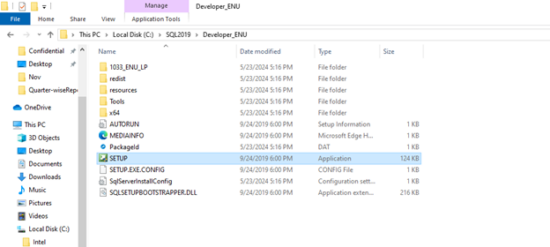
Image 1: SQL Server installer folder with setup.exe selected
  • On the SQL Server Installation Center window, click Maintenance and then click the Repair option.
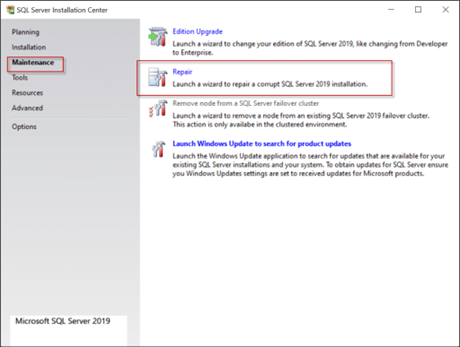
Image 2: SQL Server Installation Center – Maintenance and Repair options
  • Select the server instance you want to repair and click Next.
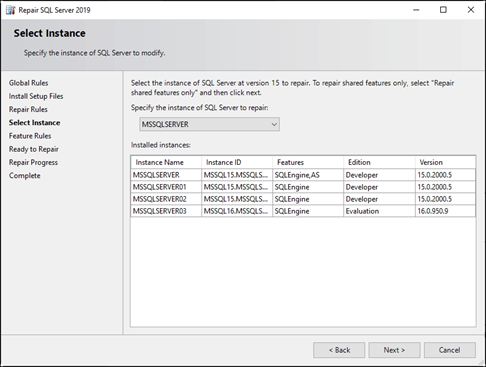
Image 3: Select SQL Server instance for repair and click Next
  • In the Ready to Repair window, verify the details and then click on the Repair option.
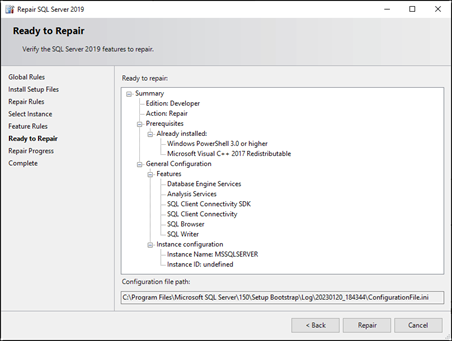
Image 4: Ready to Repair window – verify details and click Repair

Alternatively, you can run the SQL Server Installer using the below command in the Command Prompt:

setup /QUIET /ACTION=REBUILDDATABASE /INSTANCENAME=MSSQLServer /SQLSYSADMINACCOUNTS=sa  /SAPWD= MyP983”#3  /SQLCOLLATION=Latin1_General_CI_AS 

Method 2: Restore the Master Database from Backup

If you have an updated full backup, then you can use the RESTORE DATABASE T-SQL statement to restore the master database. Before restoring, make sure you are restoring the backup to the exact version or later version of SQL Server. If there is version mismatch, then you can encounter the error message, saying “Can’t be restored because it was created by a different version of the server (13.00.4435) than this server (14…)”.

Follow the below steps to restore the master database in MS SQL Server:

Step 1: Start the Server Instance in Single-User Mode

You can use the Command Prompt to start the server instance in single-user mode. Here’s how to do so:

  • Open Command Prompt on your system and run the following commands:
NET STOP MSSQLSERVER
NET START MSSQLSERVER /m
  • Next, use the SQLCMD utility to start the SQL Server
SQLCMD -S <instance> -E -d master

Alternatively, you can use the SQL Server Configuration Manager to start the instance in single-user mode. Here are the steps:

  • In your system’s search box, type SQL Server Configuration Manager and press Enter.
  • In SQL Server Configuration Manager, select the Service instance, right-click on it, and click Stop.
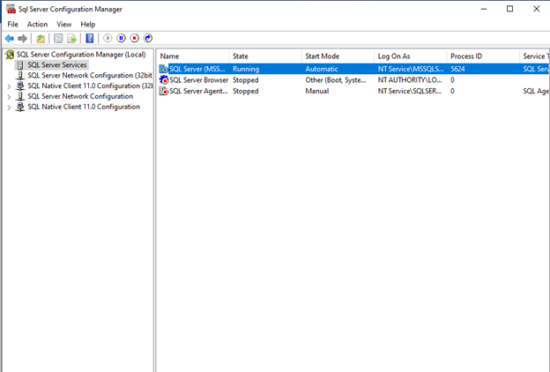
Image 5: SQL Server Configuration Manager – Stop service instance
  • Right-click the instance again and click Properties.
  • In SQL Server (MSSQLSERVER) Properties window,under Startup Parameters, specify the -m parameter, and then click on the Add button.
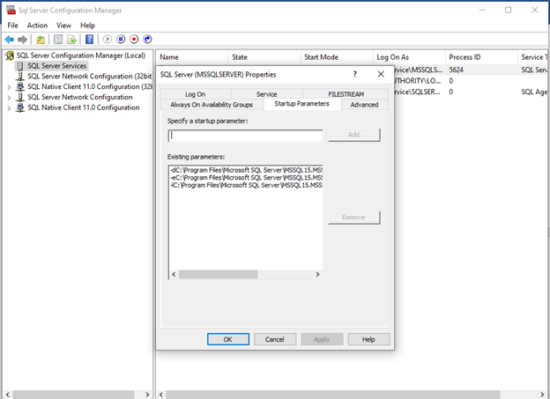
Image 6: MSSQLSERVER Properties – Add -m under Startup Parameters
  • Click OK.

The SQL Server instance will start in single-user mode.

Step 2: Restore Backup using T-SQL Statement

You can use the following RESTORE DATABASE T-SQL statement to restore a full backup of the master database:

RESTORE DATABASE master FROM  <backup_device>  WITH REPLACE

Step 3: Perform Post-Restore Tasks

Once you have restored the master database from backup, perform the below actions:

  • Restart the server instance normally without using startup parameters.
  • Make sure you’ve restored the recent full backup.
  • Save the restored master database to the original location.
  • Check and match the server-side configuration values with the previous configuration values.

Alternate Method to Restore Master Database File

If you don’t have a full backup or your backup file is not readable, then you can repair the database (MDF/NDF) file using a professional SQL repair tool, like Stellar Repair for MS SQL Technician. It can repair and recover primary and secondary database files without any file size limitations. Also, it can recover data from corrupted SQL database backup (BAK) files with complete precision. The tool can recover all the objects, such as views, tables, procedures, etc., from MDF/NDF files. It saves the recovered data in a new database file and various other formats. The tool is compatible with repairing backup files of all types, such as Full Backup, Transaction Log Backup, and Differential Backup.

Key features of Stellar Repair for MS SQL Technician:

  • Repairs primary and secondary database files.
  • Repairs severely damaged or corrupted BAK files and recovers all the data.
  • Recovers indexes, tables, stored procedures, views, keys, etc. with complete integrity.
  • Allows specific recovery of objects.
  • Allows to preview recovered data, including views, constraints, etc.
  • Supports Windows 11, 10, 8.1, 8, 7 and Windows Server 2022, 2019, 2016, and earlier versions.

Conclusion

If your master database is damaged, you may fail to access your MDF/NDF files or SQL Server instance. You can follow the methods mentioned in this post to restore the master database. If your backup file is corrupted or unreadable, you can use Stellar Repair for MS SQL Technician. It is a professional SQL repair tool that can help you restore the corrupt backup file with absolute precision. This software is compatible with all SQL Server versions.

Guest Author
  • Guest Author
    When Remote Work and Shadow IT Collide: How Companies Can Regain Visibility
  • Guest Author
    How to Recover Deleted Files from the Recycle Bin: A Simple, Step-by-Step Guide
  • Guest Author
    How to Back Up Proxmox Data with NAKIVO Backup & Replication
  • Guest Author
    An Ultimate Guide to Exchange Server Database Recovery

The opinions expressed in this post belong to the individual contributors and do not necessarily reflect the views of Information Security Buzz.

Share. Facebook Twitter LinkedIn Email Copy Link

Related Posts

Visual data is the blind spot in enterprise security: that’s about to change

May 4, 20267 Mins Read

Making stolen data worthless: why security must start with the data

March 30, 20265 Mins Read

Meta’s Smart Glasses Privacy Scandal Expands After Sama Credentials Found on the Dark Web

March 10, 20264 Mins Read
ISB-Bora-Side-Bar

 
ISB-Bora-Side-Bar
Black ISB Logo

Information Security Buzz is an independent resource that provides the experts’ comments, analysis, and opinion on the latest Cybersecurity news and topics

X (Twitter) LinkedIn Facebook RSS

Working With Us

  • About Us
  • Advertise With Us
  • Contact Us

Write For Us

  • How To Contribute

The Pages

  • Privacy Policy
  • Cookie Policy
  • AI Policy
  • Terms & Conditions
  • Copyright Notice

Information Security Buzz and all its contents are copyright © 2014-2025. All rights reserved. All third-party trademarks are recognized.

Type above and press Enter to search. Press Esc to cancel.

Manage Consent
To provide the best experiences, we use technologies like cookies to store and/or access device information. Consenting to these technologies will allow us to process data such as browsing behavior or unique IDs on this site. Not consenting or withdrawing consent, may adversely affect certain features and functions.
Functional Always active
The technical storage or access is strictly necessary for the legitimate purpose of enabling the use of a specific service explicitly requested by the subscriber or user, or for the sole purpose of carrying out the transmission of a communication over an electronic communications network.
Preferences
The technical storage or access is necessary for the legitimate purpose of storing preferences that are not requested by the subscriber or user.
Statistics
The technical storage or access that is used exclusively for statistical purposes. The technical storage or access that is used exclusively for anonymous statistical purposes. Without a subpoena, voluntary compliance on the part of your Internet Service Provider, or additional records from a third party, information stored or retrieved for this purpose alone cannot usually be used to identify you.
Marketing
The technical storage or access is required to create user profiles to send advertising, or to track the user on a website or across several websites for similar marketing purposes.
  • Manage options
  • Manage services
  • Manage {vendor_count} vendors
  • Read more about these purposes
View preferences
  • {title}
  • {title}
  • {title}