


Close Menu
  • Home
  • Articles
    • Attacks
      • BEC
      • Data Breach
      • DDoS
      • Evasion Attacks
      • Injection
      • Malware
      • MITM
      • Phishing
      • Ransomware
      • RCE
      • Social Engineering
      • Spoofing
      • Spyware
    • Business and Policy
      • BCP and DRP
      • GRC
      • Regulations
    • Data Protection
      • DLP
      • DRM
      • Encryption
      • IAM
    • Future, Trends and Insight
      • AI
      • Events & Community
      • Emerging Tech
      • Expert Panel
      • Interviews With Experts
      • Insights
      • Study & Research
    • Resources
      • Guides
      • Tools
      • Training & Education
    • Security
      • API
      • Apps
      • Cloud
      • Critical Infrastructure
      • Endpoint
      • Hardware
      • IoT
      • Mobile
      • Network
      • OT
      • Port Security
      • Security Architecture
      • Software Development
      • Supply Chain
      • Zero Trust
    • Threats and Vulnerabilities
      • Emerging Threats
      • Insider Threats
      • Risk Management
      • Threat Intelligence
      • Zero Day
  • News and Exclusives
    • Latest News
    • ISB Exclusive
    • Positive News
  • Who We Are
    • About Us
    • Information Security Buzz Expert Panel​
    • Write for Us
    • Media Pack
  • Contact Us
  • Newsletter
Facebook X (Twitter) LinkedIn
Information Security BuzzInformation Security Buzz
  • Home
  • Articles
    • Attacks
      • BEC
      • Data Breach
      • DDoS
      • Evasion Attacks
      • Injection
      • Malware
      • MITM
      • Phishing
      • Ransomware
      • RCE
      • Social Engineering
      • Spoofing
      • Spyware
    • Business and Policy
      • BCP and DRP
      • GRC
      • Regulations
    • Data Protection
      • DLP
      • DRM
      • Encryption
      • IAM
    • Future, Trends and Insight
      • AI
      • Events & Community
      • Emerging Tech
      • Expert Panel
      • Interviews With Experts
      • Insights
      • Study & Research
    • Resources
      • Guides
      • Tools
      • Training & Education
    • Security
      • API
      • Apps
      • Cloud
      • Critical Infrastructure
      • Endpoint
      • Hardware
      • IoT
      • Mobile
      • Network
      • OT
      • Port Security
      • Security Architecture
      • Software Development
      • Supply Chain
      • Zero Trust
    • Threats and Vulnerabilities
      • Emerging Threats
      • Insider Threats
      • Risk Management
      • Threat Intelligence
      • Zero Day
  • News and Exclusives
    • Latest News
    • ISB Exclusive
    • Positive News
  • Who We Are
    • About Us
    • Information Security Buzz Expert Panel​
    • Write for Us
    • Media Pack
  • Contact Us
  • Newsletter
Subscribe
Information Security BuzzInformation Security Buzz
Home - Articles - Invisible Me
Articles

Invisible Me

ISBuzz TeamBy ISBuzz TeamJune 12, 2014Updated:July 8, 20246 Mins Read
Share LinkedIn Twitter Facebook Copy Link Email
invisible-man
Share
Facebook Twitter LinkedIn Email Copy Link
Quick AI Summary
ChatGPTClaudeGeminiGrokPerplexityDeepSeekCopilot

Thieves, snoops and spies. We hear stories nearly every day of data breeches, of tracking, of identity theft. And it’s so hard to know what to do to not be so visible.

Not to mention all the tracking. Your digital life is leaving a trail that’s as evident as rabbit prints in freshly fallen snow. And you can tell. Get on the website of a major retailer or brand and, next thing you know, you’ll see ads interspersed throughout content on other websites, trying to lure you back or buy their product.

But there are things you can do to protect your privacy and stop the tracking.

Change your browser
firefox

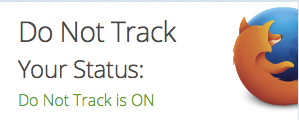
Firefox’s Do Not Track feature stops
ad networks and websites from 
tracking you.

“Committed to you, your privacy and an open Web,” the browser Firefox is a product of the global, non-profit organization Mozilla, which has privacy at the core of everything it does. Firefox is up to version 29.0.1 now and has an array of privacy features. Do Not Track is an add-on that, if you activate it, lets advertising networks, websites and apps know that they won’t be able to serve ads to you based on your digital behaviour. It does this by transmitting an HTTP Do Not Track header each time your data is requested from the web.
private

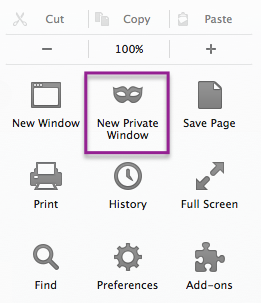
Firefox 29.0.1 lets you browse 
in hush hush mode

Private Browsing is another Firefox feature, letting you open up a private browsing window to make transactions, browse for a birthday present or even do online banking. This feature is especially useful for devices that are shared, for example for the family laptop, but it’s equally interesting for anyone who likes to surf without being tracked.  A Private Browsing window is impressive because of all the things it doesn’t do: it doesn’t remember your browsing history, passwords, search terms, it doesn’t save any cookies you encounter. It’s not a solution for anonymous surfing like VPN services can deliver, nor can it protect you from keyloggers or spyware.
lightbeam

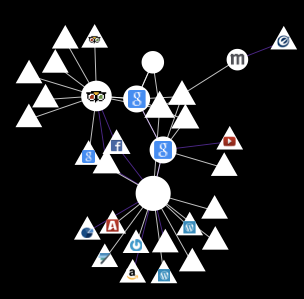
If tracking doesn’t upset you and you’d rather embrace the sites that track your behaviour than block them, there’s another Mozilla-built plug-in for that, called Lightbeam. Lightbeam is activated from your Firefox toolbar and within minutes of surfing begins to compile the lists of first and third-party connections as you encounter them. The image located on the left is a screenshot of connections after visits to a mere 7 sites, netting a total of 28 third party sites, taking roughly 2 minutes. Imagine what a week of Lightbeam will give you.

In the spirit of Mozilla, you’re given the choice to contribute. You can agree to submit your data back to them so they can study changes in behavioural targeting and develop products to help protect your privacy as the needs arise.

Change your search engine

Already back in 2008, a 3:13 video called “Google knows everything” was uploaded to YouTube. If the search giant already knew everything six years ago, imagine what it knows now. Google has so much mindshare that sometimes people forget there are alternatives, and an alternate search engine that takes your privacy seriously is Duck Duck Go. In January, 2009, the folks at Duck Duck Go made a conscious decision to stop collecting and sharing any information about its users, point blank. In January 2011, it rented a billboard in San Francisco, the heart of the tech world, which read “Google tracks you. We don’t”. In addition to being a search engine that doesn’t track you, it has a different approach to search results which can appear with a mix of image and text results.
duckduck

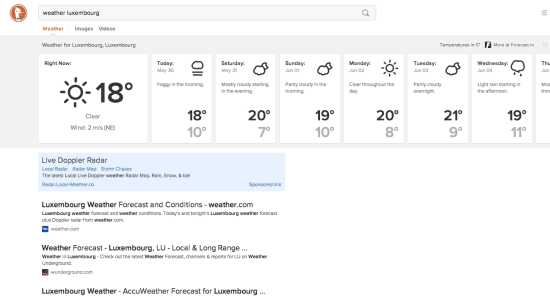
The image on the left is of a screenshot of a search result made on Duck Duck Go for weather for the city of Luxembourg. The result if extremely helpful – a visual representation for the next week, followed by a sponsored, weather-related link and then the traditional descriptive text links you would expect. But unlike many other search engines, there’s no clicking from page to page – the results keep appearing as you scroll down the page until there are no more results left to show. This functionality is perfect for mobile devices – all you need to do is keep pulling the page up to see more results.

Use a VPN Service

avpn

To keep the snoops and spies at bay, however, you should consider using a VPN service when you’re using WiFi. The VPN Service (Virtual Private Network) connects your device through your WiFi connection to a server somewhere in the world – it can be in the country you’re actually in, or it can be a server in another country, like the USA. Once you’ve connected, your IP address – where your device is located on the Internet – is changed into the IP address of the server you’re connected to.

Because your IP address is now a US address, many websites will use that IP address knowledge to serve you content and pricing as if you are in the USA – so in dollars instead of Euros (if you’re located in Europe, for example).

A VPN service like VPN Shield, pictured in the image above, is especially useful if you’re on public WiFi at, say, a hotel, coffee shop, shopping mall or any other public place, as VPNs encrypt your data while the connection is in place. It also means that the ISP – whether your own ISP at home or the ISP at the location where you’re using their WiFi – no longer knows what sites you’re surfing. They will know that you’re connected, but not know to what.

The privacy debate has really just begun. With so many millions of devices hitting the market each year, including wearable technology, the tracking that’s being done now and will be done in the future is something each one of us needs to personally consider and make a decision about – and review regularly. You may have many devices, but you only have one you, and you just might want to make yourself digitally invisible.

By Colleen O´Shea

Colleen O’Shea is a writer who writes is interested in several different subjects including business aviation, virtual private networks (VPN) and Wi-Fi. Her blog, WiFi Trends, is at . Follow her on Twitter here: @colleen_o_shea


ISBuzz Team
  • ISBuzz Team
    Air Canada Data Breach: BianLian Extortion Group Claims A Massive Heist Contrary To Airline’s Earlier Statement
  • ISBuzz Team
    Unprecedented DDoS Attack Rocks The Web: Tech Giants Reveal A Digital Tsunami
  • ISBuzz Team
    CISA Flags High-Severity Adobe Acrobat Reader Flaw Amid Active Exploits
  • ISBuzz Team
    Curl Security Alert: Patching A Critical Bug Averting Potential Cyber Catastrophe

The opinions expressed in this post belong to the individual contributors and do not necessarily reflect the views of Information Security Buzz.

Share. Facebook Twitter LinkedIn Email Copy Link

Related Posts

The Real Cost of Inconsistent Third-Party Access

December 18, 20255 Mins Read

What Happens When Devices Cross Borders? The Role of Geofencing in Global IT

August 7, 20256 Mins Read

The Evolving Importance of Identity Governance in FinTech

July 10, 20258 Mins Read
ISB-Bora-Side-Bar

 
ISB-Bora-Side-Bar
Black ISB Logo

Information Security Buzz is an independent resource that provides the experts’ comments, analysis, and opinion on the latest Cybersecurity news and topics

X (Twitter) LinkedIn Facebook RSS

Working With Us

  • About Us
  • Advertise With Us
  • Contact Us

Write For Us

  • How To Contribute

The Pages

  • Privacy Policy
  • Cookie Policy
  • AI Policy
  • Terms & Conditions
  • Copyright Notice

Information Security Buzz and all its contents are copyright © 2014-2025. All rights reserved. All third-party trademarks are recognized.

Type above and press Enter to search. Press Esc to cancel.

Manage Consent
To provide the best experiences, we use technologies like cookies to store and/or access device information. Consenting to these technologies will allow us to process data such as browsing behavior or unique IDs on this site. Not consenting or withdrawing consent, may adversely affect certain features and functions.
Functional Always active
The technical storage or access is strictly necessary for the legitimate purpose of enabling the use of a specific service explicitly requested by the subscriber or user, or for the sole purpose of carrying out the transmission of a communication over an electronic communications network.
Preferences
The technical storage or access is necessary for the legitimate purpose of storing preferences that are not requested by the subscriber or user.
Statistics
The technical storage or access that is used exclusively for statistical purposes. The technical storage or access that is used exclusively for anonymous statistical purposes. Without a subpoena, voluntary compliance on the part of your Internet Service Provider, or additional records from a third party, information stored or retrieved for this purpose alone cannot usually be used to identify you.
Marketing
The technical storage or access is required to create user profiles to send advertising, or to track the user on a website or across several websites for similar marketing purposes.
  • Manage options
  • Manage services
  • Manage {vendor_count} vendors
  • Read more about these purposes
View preferences
  • {title}
  • {title}
  • {title}