

Close Menu
  • Home
  • Articles
    • Attacks
      • BEC
      • Data Breach
      • DDoS
      • Evasion Attacks
      • Injection
      • Malware
      • MITM
      • Phishing
      • Ransomware
      • RCE
      • Social Engineering
      • Spoofing
      • Spyware
    • Business and Policy
      • BCP and DRP
      • GRC
      • Regulations
    • Data Protection
      • DLP
      • DRM
      • Encryption
      • IAM
    • Future, Trends and Insight
      • AI
      • Events & Community
      • Emerging Tech
      • Expert Panel
      • Interviews With Experts
      • Insights
      • Study & Research
    • Resources
      • Guides
      • Tools
      • Training & Education
    • Security
      • API
      • Apps
      • Cloud
      • Critical Infrastructure
      • Endpoint
      • Hardware
      • IoT
      • Mobile
      • Network
      • OT
      • Port Security
      • Security Architecture
      • Software Development
      • Supply Chain
      • Zero Trust
    • Threats and Vulnerabilities
      • Emerging Threats
      • Insider Threats
      • Risk Management
      • Threat Intelligence
      • Zero Day
  • News and Exclusives
    • Latest News
    • ISB Exclusive
    • Positive News
  • Who We Are
    • About Us
    • Information Security Buzz Expert Panel​
    • Write for Us
    • Media Pack
  • Contact Us
  • Newsletter
Facebook X (Twitter) LinkedIn
Information Security BuzzInformation Security Buzz
  • Home
  • Articles
    • Attacks
      • BEC
      • Data Breach
      • DDoS
      • Evasion Attacks
      • Injection
      • Malware
      • MITM
      • Phishing
      • Ransomware
      • RCE
      • Social Engineering
      • Spoofing
      • Spyware
    • Business and Policy
      • BCP and DRP
      • GRC
      • Regulations
    • Data Protection
      • DLP
      • DRM
      • Encryption
      • IAM
    • Future, Trends and Insight
      • AI
      • Events & Community
      • Emerging Tech
      • Expert Panel
      • Interviews With Experts
      • Insights
      • Study & Research
    • Resources
      • Guides
      • Tools
      • Training & Education
    • Security
      • API
      • Apps
      • Cloud
      • Critical Infrastructure
      • Endpoint
      • Hardware
      • IoT
      • Mobile
      • Network
      • OT
      • Port Security
      • Security Architecture
      • Software Development
      • Supply Chain
      • Zero Trust
    • Threats and Vulnerabilities
      • Emerging Threats
      • Insider Threats
      • Risk Management
      • Threat Intelligence
      • Zero Day
  • News and Exclusives
    • Latest News
    • ISB Exclusive
    • Positive News
  • Who We Are
    • About Us
    • Information Security Buzz Expert Panel​
    • Write for Us
    • Media Pack
  • Contact Us
  • Newsletter
Subscribe
Information Security BuzzInformation Security Buzz
Home - Data Loss Prevention - How to Recover Deleted Files from the Recycle Bin: A Simple, Step-by-Step Guide
Data Loss Prevention Articles CyberSecurity Tools Data Protection Industry News

How to Recover Deleted Files from the Recycle Bin: A Simple, Step-by-Step Guide

Guest AuthorBy Guest AuthorMay 2, 20254 Mins Read
Share LinkedIn Twitter Facebook Copy Link Email
How to Recover Deleted Files from the Recycle Bin
Share
Facebook Twitter LinkedIn Email Copy Link
Quick AI Summary
ChatGPTClaudeGeminiGrokPerplexityDeepSeekCopilot

Restoring recently deleted files from the Recycle Bin usually takes just a few clicks. But what if the files are no longer there?  You may have emptied the Recycle Bin by mistake, or it happened automatically. That’s a different situation altogether.

To get straight to the point—you have two main options:

  1. Check for backups if you have them.
  2. Use data recovery softwareif no backups are available.

Fortunately, many data recovery software can help recover permanently deleted files, provided they haven’t been overwritten. This blog will explain how to recover deleted files using built-in Windows features and using the best free data recovery software.

Is It Possible to Recover Data from the Recycle Bin?

You might wonder whether recovering files is possible after emptying the Recycle Bin. The short answer is yes—files deleted from the Recycle Bin can still be recovered because they remain on the storage device until new data overwrites them.

Windows does offer the Windows File Recovery tool, but it’s a command-line utility with limited usability. But many users prefer third-party data recovery software for a more efficient and user-friendly experience.

For a simpler solution, Stellar Data Recovery Software provides a free and easy way to scan for and restore lost files.

However, successful recovery depends on several factors, such as:

  • The cause of data loss.
  • The quality of the recovery tool used.
  • The time elapsed since the deletion.
  • The type of storage device.

To maximize your chances, start the recovery process as soon as possible and use the best available tool.

Manual Methods for Data Recovery

Before using data recovery software, check if Windows’ built-in backup options can restore your files.

1. Restore Previous Versions (File History)

If File Historywas enabled before deletion, follow these steps:

  1. Right-click the folder where the deleted file was stored.
  2. Select Restore previous versions from the menu.
  3. Choose the version you want and click Restore.

2. Restore Files from Windows Backup & Restore

If Windows Backup & Restore was set up, follow these steps:

For Windows 10 Users:

  1. Open Settings and go to Update & Security > Backup.
  2. Looking for an older backup? Click Go to Backup and Restore (Windows 7).
  3. Click Restore my files and follow the on-screen instructions.

For Windows 11 Users:

  1. Open Control Panel(Press Windows + R, type Control Panel, and press Enter).
  2. Go to System and Security > Backup and Restore (Windows 7).
  3. Select Restore my files or Select another backup to restore files from.
  4. Follow the on-screen instructions to complete the process.

If these methods don’t work, using DIY recovery software is your best option.

Recover Deleted Files with Stellar Data Recovery Software

If you don’t have a backup, free data recovery software from Stellar is your best bet. It allows you to recover up to 1 GB of deleted files for free.

How to Recover Files Using the Best DIY Software

  1. Download and install the data recovery software from the official website.
  2. Launch the software and select the file types to restore (documents, photos, videos, etc.).
  3. Choose the location where the files were originally stored.
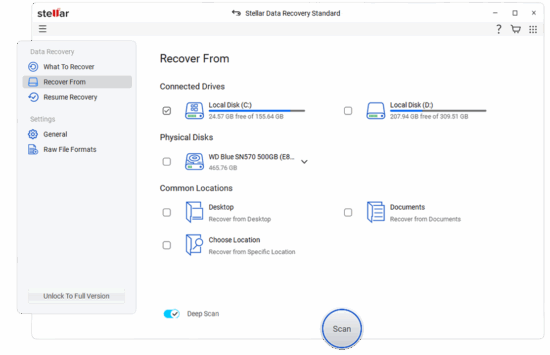
Stellar-Data-Recovery-1
  1. Click Scan to start searching for recoverable files.
  2. Once the scan is complete, preview and select the files you want to restore.
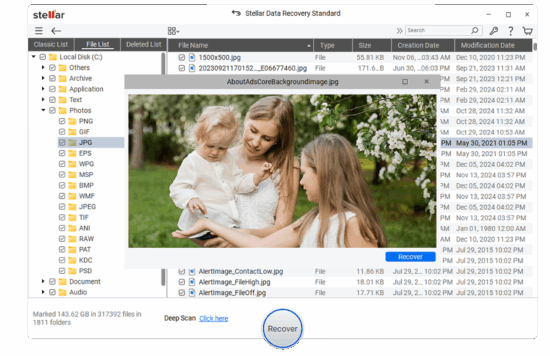
Stellar-Data-Recovery-2
  1. Click Restore and save the files to a different drive to prevent overwriting.

Why Choose Stellar?

Stellar stands out as one of the best tools for recovering lost files, thanks to its powerful features:

  • User-Friendly Interface – Simple and intuitive, making data recovery effortless.
  • Support for Multiple File Types – Recovers documents, photos, videos, emails, and more.
  • Fast & Deep Scanning Modes – Quickly finds recently deleted files, while Deep Scan helps recover more complex data losses.
  • Supports Various Storage Devices – Works with HDDs, SSDs, USB drives, and memory cards.
  • Free Recovery Up to 1 GB – Ideal for small recoveries without needing a paid license.

Conclusion

Emptying the Recycle Bin doesn’t mean your files are lost forever. You can attempt recovery using Windows’ built-in tools like File History and Backup & Restore.

However, if those methods don’t work, free data recovery software from Stellar provides an easy and reliable solution to recover up to 1 GB of lost files for free.

Key Takeaways for Successful Data Recovery:

  • Act quickly to prevent data from being overwritten.
  • Avoid saving new files on the same drive.
  • Use a reliable data recovery tool like Stellar for the best results.
Guest Author
  • Guest Author
    When Remote Work and Shadow IT Collide: How Companies Can Regain Visibility
  • Guest Author
    How to Rebuild and Restore SQL Server Master Database
  • Guest Author
    How to Back Up Proxmox Data with NAKIVO Backup & Replication
  • Guest Author
    An Ultimate Guide to Exchange Server Database Recovery

The opinions expressed in this post belong to the individual contributors and do not necessarily reflect the views of Information Security Buzz.

Share. Facebook Twitter LinkedIn Email Copy Link

Related Posts

Why indexing and classification are key to delivering corporate data hygiene

April 2, 20257 Mins Read

US Joins International Crackdown on RedLine and META Infostealers

October 30, 20242 Mins Read
ISB-Bora-Side-Bar

No se ha podido establecer conexión. Error 429

 
ISB-Bora-Side-Bar
Black ISB Logo

Information Security Buzz is an independent resource that provides the experts’ comments, analysis, and opinion on the latest Cybersecurity news and topics

X (Twitter) LinkedIn Facebook RSS

Working With Us

  • About Us
  • Advertise With Us
  • Contact Us

Write For Us

  • How To Contribute

The Pages

  • Privacy Policy
  • Cookie Policy
  • AI Policy
  • Terms & Conditions
  • Copyright Notice

Information Security Buzz and all its contents are copyright © 2014-2025. All rights reserved. All third-party trademarks are recognized.

Type above and press Enter to search. Press Esc to cancel.

Manage Consent
To provide the best experiences, we use technologies like cookies to store and/or access device information. Consenting to these technologies will allow us to process data such as browsing behavior or unique IDs on this site. Not consenting or withdrawing consent, may adversely affect certain features and functions.
Functional Always active
The technical storage or access is strictly necessary for the legitimate purpose of enabling the use of a specific service explicitly requested by the subscriber or user, or for the sole purpose of carrying out the transmission of a communication over an electronic communications network.
Preferences
The technical storage or access is necessary for the legitimate purpose of storing preferences that are not requested by the subscriber or user.
Statistics
The technical storage or access that is used exclusively for statistical purposes. The technical storage or access that is used exclusively for anonymous statistical purposes. Without a subpoena, voluntary compliance on the part of your Internet Service Provider, or additional records from a third party, information stored or retrieved for this purpose alone cannot usually be used to identify you.
Marketing
The technical storage or access is required to create user profiles to send advertising, or to track the user on a website or across several websites for similar marketing purposes.
  • Manage options
  • Manage services
  • Manage {vendor_count} vendors
  • Read more about these purposes
View preferences
  • {title}
  • {title}
  • {title}