


Close Menu
  • Home
  • Articles
    • Attacks
      • BEC
      • Data Breach
      • DDoS
      • Evasion Attacks
      • Injection
      • Malware
      • MITM
      • Phishing
      • Ransomware
      • RCE
      • Social Engineering
      • Spoofing
      • Spyware
    • Business and Policy
      • BCP and DRP
      • GRC
      • Regulations
    • Data Protection
      • DLP
      • DRM
      • Encryption
      • IAM
    • Future, Trends and Insight
      • AI
      • Events & Community
      • Emerging Tech
      • Expert Panel
      • Interviews With Experts
      • Insights
      • Study & Research
    • Resources
      • Guides
      • Tools
      • Training & Education
    • Security
      • API
      • Apps
      • Cloud
      • Critical Infrastructure
      • Endpoint
      • Hardware
      • IoT
      • Mobile
      • Network
      • OT
      • Port Security
      • Security Architecture
      • Software Development
      • Supply Chain
      • Zero Trust
    • Threats and Vulnerabilities
      • Emerging Threats
      • Insider Threats
      • Risk Management
      • Threat Intelligence
      • Zero Day
  • News and Exclusives
    • Latest News
    • ISB Exclusive
    • Positive News
  • Who We Are
    • About Us
    • Information Security Buzz Expert Panel​
    • Write for Us
    • Media Pack
  • Contact Us
  • Newsletter
Facebook X (Twitter) LinkedIn
Information Security BuzzInformation Security Buzz
  • Home
  • Articles
    • Attacks
      • BEC
      • Data Breach
      • DDoS
      • Evasion Attacks
      • Injection
      • Malware
      • MITM
      • Phishing
      • Ransomware
      • RCE
      • Social Engineering
      • Spoofing
      • Spyware
    • Business and Policy
      • BCP and DRP
      • GRC
      • Regulations
    • Data Protection
      • DLP
      • DRM
      • Encryption
      • IAM
    • Future, Trends and Insight
      • AI
      • Events & Community
      • Emerging Tech
      • Expert Panel
      • Interviews With Experts
      • Insights
      • Study & Research
    • Resources
      • Guides
      • Tools
      • Training & Education
    • Security
      • API
      • Apps
      • Cloud
      • Critical Infrastructure
      • Endpoint
      • Hardware
      • IoT
      • Mobile
      • Network
      • OT
      • Port Security
      • Security Architecture
      • Software Development
      • Supply Chain
      • Zero Trust
    • Threats and Vulnerabilities
      • Emerging Threats
      • Insider Threats
      • Risk Management
      • Threat Intelligence
      • Zero Day
  • News and Exclusives
    • Latest News
    • ISB Exclusive
    • Positive News
  • Who We Are
    • About Us
    • Information Security Buzz Expert Panel​
    • Write for Us
    • Media Pack
  • Contact Us
  • Newsletter
Subscribe
Information Security BuzzInformation Security Buzz
Home - News & Analysis - Windows XP End-Of-Life in Under 80 Days: Are You Ready?
News & Analysis

Windows XP End-Of-Life in Under 80 Days: Are You Ready?

ISBuzz TeamBy ISBuzz TeamJanuary 21, 2014Updated:April 30, 20254 Mins Read
Share LinkedIn Twitter Facebook Copy Link Email
windows xp
Share
Facebook Twitter LinkedIn Email Copy Link
Quick AI Summary
ChatGPTClaudeGeminiGrokPerplexityDeepSeekCopilot

On 8th April 2014 Microsoft will end mainstream support for Windows XP. Usually the end of life of an operating system is not that much of a big deal, but with over 20% of Windows PCs still running XP this is a significant event.

At this time Microsoft will no longer release updates, hotfixes, support options and online technical content updates for XP. Updates for XP Security Essentials were also due to cease at this time, however Microsoft (becoming famous for their U-turns) have recently announced updates for will continue for a further 12 months. Independent IT-Security Institute AV-Test recently discussed which third-party antivirus solutions will continue to protect and support Windows XP computers.

What Happens to PCs on XP After 8th April 2014?

“Not with a bang but a whimper” – Windows XP machines will continue to work as normal and there will not be any kind of immediately limitations imposed on the OS crippling its usage. However just like an antivirus with an expired subscription the PC will gradually become more susceptible to attacks as vulnerabilities go unpatched.

There will be no doubt that hackers and other nefarious malware writers will take advantage of all remaining XP users after this date, continuing to look for security holes and reverse engineering patches for Windows 7 & 8 to locate unpatched XP vulnerabilities.

As is the case for Windows 98 and 2000 now, future software releases will cease to be compatible with XP, and hardware drivers will not be developed.

What does this mean for businesses?

The ramifications for businesses are major with factors such as compliance, privacy and security issues just the tip of the iceberg, combined with increased IT support costs as programs and drivers become obsolete.

Numerous businesses have legacy issues locking them into Windows XP, their IT teams should look to mitigate the risks by virtualizing the system or restricting Internet and email access for XP machines as this is where the majority of cyber-threats will originate.

Microsoft will provide Extended Support to their biggest customers – at the bonus-bargain prices of: $200 per desktop for year one, $400 for year two and $800 for a third year.

What does this mean for home users? New or Upgrade?
[wp_ad_camp_4]
This led me to consider what to do with the ‘Living Room Computer’ (LRC), a 4 year old Acer Aspire Netbook with its 1.6Ghz CPU and 1GB RAM running Windows XP sufficiently well for browsing, light office tasks and Cbeebies for ‘the hobbits’ (so they keep their sticky hands off my main computer).

Rather than choose the simple “buy a new computer or tablet” I decided the LRC would be an upgrade test project, however with its current specifications installing Windows 7 or 8 would render it less than usable. Additional RAM and upgrading to an SSD looked to be the only real options for upgrading the LRC without resorting to the dark-arts of overclocking the CPU.

Some well placed bids on ebay secured me a replacement 2GB RAM for £7 and an 80GB SDD for £55, which combined with a spare copy of Windows 7 on a USB, and according to the Panda technical team “just enough knowledge to be dangerous” and I was ready to go.

With only one computer to upgrade, and the knowledge of the Panda UK technical support team at work when I got stuck, it still took a few evenings to complete. First backing up data to an external HD, installing and updating fresh copy of Windows 7 and then restoring data and programs back on it. However the overall process was about as technical as printing out some photos from a memory card on the machines in Boots – Microsoft have really improved the installation experience in their modern Operating Systems.
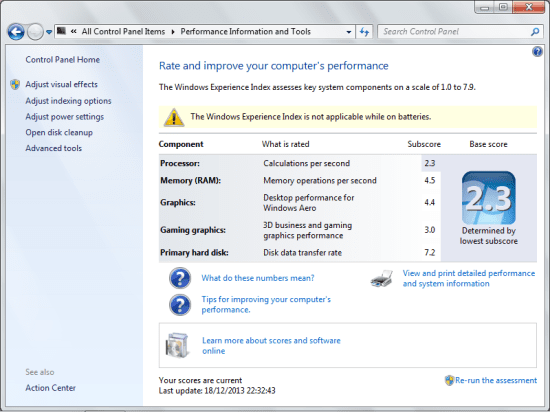
Panda Sec 1While it’s never going to win any speed tests the LRC with upgrades is now happily running Windows 7 and fulfilling all the day-to-day tasks at least as fast as it did under XP. Additionally thanks to the SSDs’ lack of moving parts the battery life has improved noticeably. The WEI score of 2.3 is limited by the CPU so maybe investigating overclocking could be the next step.

It appears that upgrading is an option on all but the oldest of computers.

But is it the best option?  

Who can help you?

If you are in the situation where you’re still using XP either on a single computer at home or multiple work computers, and don’t have the time available to upgrade, there are plenty of IT Support companies, and PC Vendors who would be happy to advise and assist you in the transition.

Anybody continuing to use XP does so at their own risk!

Neil Martin, Marketing Manager, Panda Security UK

ISBuzz Team
  • ISBuzz Team
    Air Canada Data Breach: BianLian Extortion Group Claims A Massive Heist Contrary To Airline’s Earlier Statement
  • ISBuzz Team
    Unprecedented DDoS Attack Rocks The Web: Tech Giants Reveal A Digital Tsunami
  • ISBuzz Team
    CISA Flags High-Severity Adobe Acrobat Reader Flaw Amid Active Exploits
  • ISBuzz Team
    Curl Security Alert: Patching A Critical Bug Averting Potential Cyber Catastrophe

The opinions expressed in this post belong to the individual contributors and do not necessarily reflect the views of Information Security Buzz.

Share. Facebook Twitter LinkedIn Email Copy Link

Related Posts

The Real Cost of Inconsistent Third-Party Access

December 18, 20255 Mins Read

What Happens When Devices Cross Borders? The Role of Geofencing in Global IT

August 7, 20256 Mins Read

The Evolving Importance of Identity Governance in FinTech

July 10, 20258 Mins Read
ISB-Bora-Side-Bar

 
ISB-Bora-Side-Bar
Black ISB Logo

Information Security Buzz is an independent resource that provides the experts’ comments, analysis, and opinion on the latest Cybersecurity news and topics

X (Twitter) LinkedIn Facebook RSS

Working With Us

  • About Us
  • Advertise With Us
  • Contact Us

Write For Us

  • How To Contribute

The Pages

  • Privacy Policy
  • Cookie Policy
  • AI Policy
  • Terms & Conditions
  • Copyright Notice

Information Security Buzz and all its contents are copyright © 2014-2025. All rights reserved. All third-party trademarks are recognized.

Type above and press Enter to search. Press Esc to cancel.

Manage Consent
To provide the best experiences, we use technologies like cookies to store and/or access device information. Consenting to these technologies will allow us to process data such as browsing behavior or unique IDs on this site. Not consenting or withdrawing consent, may adversely affect certain features and functions.
Functional Always active
The technical storage or access is strictly necessary for the legitimate purpose of enabling the use of a specific service explicitly requested by the subscriber or user, or for the sole purpose of carrying out the transmission of a communication over an electronic communications network.
Preferences
The technical storage or access is necessary for the legitimate purpose of storing preferences that are not requested by the subscriber or user.
Statistics
The technical storage or access that is used exclusively for statistical purposes. The technical storage or access that is used exclusively for anonymous statistical purposes. Without a subpoena, voluntary compliance on the part of your Internet Service Provider, or additional records from a third party, information stored or retrieved for this purpose alone cannot usually be used to identify you.
Marketing
The technical storage or access is required to create user profiles to send advertising, or to track the user on a website or across several websites for similar marketing purposes.
  • Manage options
  • Manage services
  • Manage {vendor_count} vendors
  • Read more about these purposes
View preferences
  • {title}
  • {title}
  • {title}